Getting Started
Installing
Section titled “Installing”bun add headbreaker-ts
# optional: manually add konva to your project if you want to use# it as rendering backendbun add konvaTL;DR sample
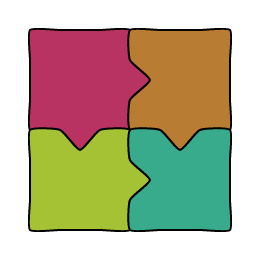
Section titled “TL;DR sample”If you just want to see a very basic 2×2 puzzle in your web browser, create an HTML file with the following contents:
<script src="https://shadowninex.github.io/headbreaker/js/headbreaker.js"></script><body> <div id="puzzle"></div> <script> const autogen = new headbreaker.Canvas('puzzle', { width: 800, height: 650, pieceSize: 100, proximity: 20, borderFill: 10, strokeWidth: 2, lineSoftness: 0.18, }); autogen.autogenerate({ horizontalPiecesCount: 2, verticalPiecesCount: 2, metadata: [ {color: '#B83361'}, {color: '#B87D32'}, {color: '#A4C234'}, {color: '#37AB8C'} ] }); autogen.draw(); </script></body>And voilà! 🎊
How it works
Section titled “How it works”headbreaker — a Spanish pun for rompecabezas — solves two different but related problems:
- It implements a jigsaw-like data structure, which can be used for modelling, traversing, importing/exporting and rendering. This data structure is 100% pure TypeScript with no dependencies, and works in both browsers and headless environments.
- It implements a simple and generic rendering system for the Web.
headbreakerships a fully functional Konva.js-based implementation, but you can develop and use your own.
HTML Puzzle
Section titled “HTML Puzzle”<!-- just add a div with an id... --><div id="my-canvas"></div>
<script> // ...and a script with the following code: let dali = new Image(); dali.src = 'static/dali.jpg'; dali.onload = () => { const canvas = new headbreaker.Canvas('my-canvas', { width: 800, height: 800, image: dali }); canvas.autogenerate(); canvas.shuffle(0.7); canvas.draw(); }</script>Canvas is a visual representation of a Puzzle and as such, it mirrors many of the most common Puzzle methods. If you need to access the associated Puzzle object, call the puzzle accessor:
// create and configure the canvasconst canvas = new headbreaker.Canvas(...);// ...
// now you can access and interact with the puzzle objectconst puzzle = canvas.puzzle;
What’s next?
Section titled “What’s next?”- Check out the Samples for interactive demos
- Learn about Headless Puzzles for server-side usage
- See React or Vue integration guides